

The PSyIR#
The PSyIR (PSyclone Intermediate Representation) is at the heart of PSyclone, representing both existing code and PSyKAl DSLs (at both the PSy- and kernel-layer levels). A PSyIR tree may be constructed from scratch (in Python) or by processing existing source code using a frontend. Transformations act on the PSyIR and ultimately the generated code is produced by one of the PSyIR’s backends.
PSyIR Nodes#
The PSyIR consists of classes whose instances can be connected
together to form a tree which represent computation in a
syntax-independent way. These classes all inherit from the Node
baseclass and, as a result, PSyIR instances are often referred to
collectively as ‘PSyIR nodes’.
At the present time PSyIR classes can be essentially split into two types: language-level nodes, which are nodes that the PSyIR backends support, and therefore they can be directly translated to code; and higher-level nodes, which are additional nodes that each domain can insert. These nodes must implement a lower_to_language_level method in order to be converted to their equivalent representation using only language-level nodes. This then permits code to be generated for them.
The rest of this document describes only the language-level nodes, but as all nodes inherit from the same base classes, the methods described here are applicable to all PSyIR nodes.
Available language-level nodes#
Text Representation#
When developing a transformation script it is often necessary to examine
the structure of the PSyIR. All nodes in the PSyIR have the view method
that provides a text-representation of that node and all of its descendants.
If the termcolor package is installed (see Getting Going) then
colour highlighting is used as part of the output string.
For instance, part of the Schedule constructed for the second NEMO
example is rendered as:
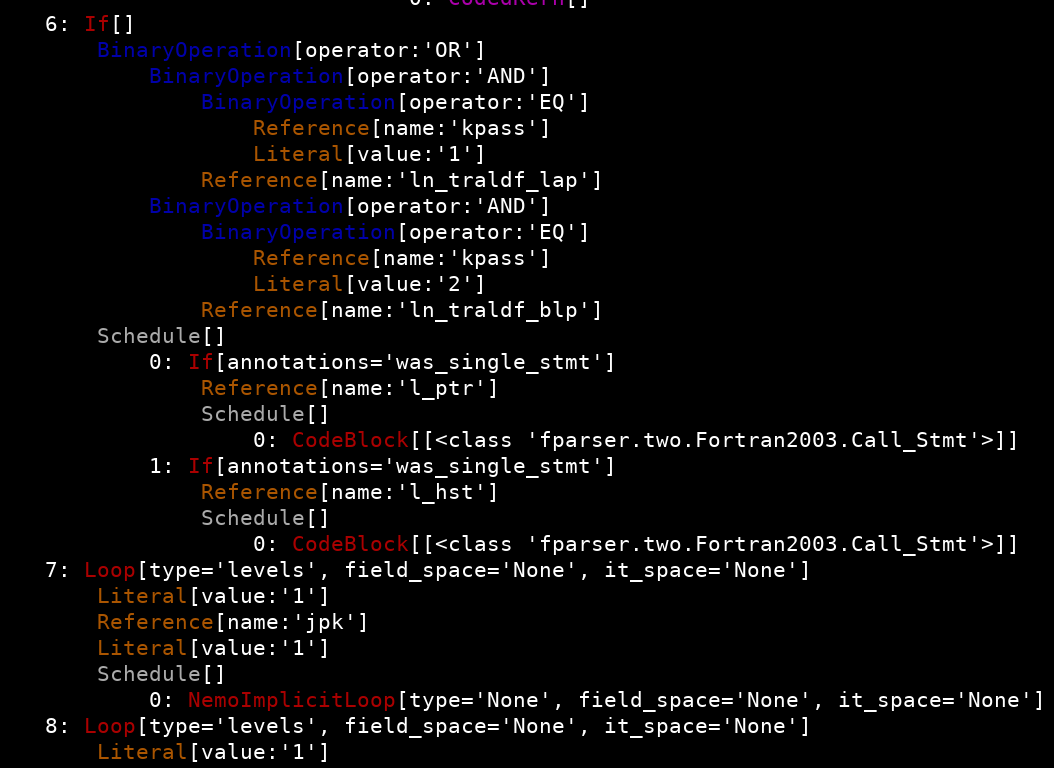
Note that in this view, only those nodes which are children of
Schedules have their indices shown. This means that nodes representing
e.g. loop bounds or the conditional part of if statements are not
indexed. For the example shown, the PSyIR node representing the
if(l_hst) code would be reached by
schedule.children[14].if_body.children[1] or, using the shorthand
notation (see below), schedule[14].if_body[1] where schedule is
the overall parent Schedule node (omitted from the above image).
One problem with the view method is that the output can become very
large for big ASTs and is not readable for users unfamiliar with the PSyIR.
An alternative to it is the debug_string method that generates a
text representation with Fortran-like syntax but on which the high abstraction
constructs have not yet been lowered to Fortran level and instead they will be
embedded as < node > expressions.
DataTypes#
The PSyIR supports the following datatypes: ScalarType,
ArrayType, StructureType, UnresolvedType, UnsupportedType
and NoType. These datatypes are used when creating instances of
DataSymbol, RoutineSymbol and Literal (although note that NoType may
only be used with a RoutineSymbol). UnresolvedType and UnsupportedType
are both used when processing existing code. The former is used
when a symbol is being imported from some other scope (e.g. via a USE
statement in Fortran) that hasn’t yet been resolved and the latter is
used when an unsupported form of declaration is encountered.
More information on each of these various datatypes is given in the following subsections.
Scalar DataType#
A Scalar datatype consists of an intrinsic and a precision.
The intrinsic can be one of INTEGER, REAL, BOOLEAN and
CHARACTER.
The precision can be UNDEFINED, SINGLE, DOUBLE, an integer
value specifying the precision in bytes, or a datasymbol (see Section
Symbols and Symbol Tables) that contains precision information. Note that
UNDEFINED, SINGLE and DOUBLE allow the precision to be set
by the system so may be different for different architectures. For
example:
>>> char_type = ScalarType(ScalarType.Intrinsic.CHARACTER,
...                        ScalarType.Precision.UNDEFINED)
>>> int_type = ScalarType(ScalarType.Intrinsic.INTEGER,
...                       ScalarType.Precision.SINGLE)
>>> bool_type = ScalarType(ScalarType.Intrinsic.BOOLEAN, 4)
>>> symbol = DataSymbol("rdef", int_type, initial_value=4)
>>> scalar_type = ScalarType(ScalarType.Intrinsic.REAL, Reference(symbol))
For convenience ScalarType has static methods to create a number of common scalar datatypes:
ScalarType.integer_type()ScalarType.integer_single_type()ScalarType.integer_double_type()ScalarType.integer4_type()ScalarType.integer8_type()ScalarType.real_type()ScalarType.real_single_type()ScalarType.real_double_type()ScalarType.real4_type()ScalarType.real8_type()ScalarType.character_type()ScalarType.boolean_type()
Array DataType#
An Array datatype itself has another datatype (or DataTypeSymbol)
specifying the type of its elements and a shape. The shape can have an
arbitrary number of dimensions. Each dimension captures what is known
about its extent. It is necessary to distinguish between three cases:
Description |
Entry in |
|---|---|
An array that has explicit bound expressions. |
|
An array has a definite extent which is not known at compile time but can be queried at runtime. |
|
It is not known whether an array has memory allocated to it in the current scoping unit. |
|
where ArrayType.ArrayBounds is a dataclass with lower and
upper members holding the lower- and upper-bounds of the extent of a
given array dimension. Sometimes, the lower bound of an array will be
known while its extent is unknown. This is represented by having the
upper member set to ArrayType.Extent.ATTRIBUTE.
The distinction between the last two cases is that in the former the extents are known but are kept internally with the array (for example an assumed-shape array in Fortran) while in the latter, the array has not yet been allocated any memory (for example the declaration of an allocatable array in Fortran) so the extents may have not yet been defined.
For example:
>>> array_type = ArrayType(ScalarType.real4_type(), [5, 10])

>>> n_var = DataSymbol("n", ScalarType.integer_type())
>>> array_type = ArrayType(ScalarType.integer_type(),
...                        [Reference(n_var),
...                         Reference(n_var)])

>>> array_type = ArrayType(ScalarType.real8_type(),
...                        [ArrayType.Extent.ATTRIBUTE,
...                         ArrayType.Extent.ATTRIBUTE])

>>> array_type = ArrayType(ScalarType.boolean_type(), [ArrayType.Extent.DEFERRED])
Note that Fortran “assumed-size” arrays (which have the last dimension
specified with a *) are not supported in the PSyIR and any such
declaration will result in a DataSymbol of UnsupportedFortranType.
Structure Datatype#
A Structure datatype consists of a dictionary of components where the
name of each component is used as the corresponding key. Each component
is stored as a named tuple with name, datatype and visibility
members.
For example:
# Shorthand for a scalar type with REAL_KIND precision
SCALAR_TYPE = ScalarType(ScalarType.Intrinsic.REAL, REAL_KIND)

# Structure-type definition
GRID_TYPE = StructureType.create([
    ("dx", SCALAR_TYPE, Symbol.Visibility.PUBLIC),
    ("dy", SCALAR_TYPE, Symbol.Visibility.PUBLIC)])

GRID_TYPE_SYMBOL = DataTypeSymbol("grid_type", GRID_TYPE)

# A structure-type containing other structure types
FIELD_TYPE_DEF = StructureType.create(
    [("data", ArrayType(SCALAR_TYPE, [10]), Symbol.Visibility.PUBLIC),
     ("grid", GRID_TYPE_SYMBOL, Symbol.Visibility.PUBLIC),
     ("sub_meshes", ArrayType(GRID_TYPE_SYMBOL, [3]),
      Symbol.Visibility.PUBLIC),
     ("flag", ScalarType.integer4_type(), Symbol.Visibility.PUBLIC)])
Unknown DataType#
If a PSyIR frontend encounters an unsupported declaration then the
corresponding Symbol is given UnsupportedType.
The text of the original declaration is stored in the type object and is
available via the declaration property.
NoType#
NoType represents the empty type, equivalent to void in C. It
is currently only used to describe a RoutineSymbol that has no return
type (such as a Fortran subroutine).
Symbols and Symbol Tables#
Some PSyIR nodes have an associated Symbol Table (psyclone.psyir.symbols.SymbolTable) which keeps a record of the Symbols (psyclone.psyir.symbols.Symbol) specified and used within them.
Symbol Tables can be nested (i.e. a node with an attached symbol table can be an ancestor or descendant of a node with an attached symbol table). If the same symbol name is used in a hierarchy of symbol tables then the symbol within the symbol table attached to the closest ancestor node is in scope. By default, symbol tables are aware of other symbol tables and will return information about relevant symbols from all symbol tables.
The SymbolTable has the following interface:
- class psyclone.psyir.symbols.SymbolTable(node=None, default_visibility=Visibility.PUBLIC)[source]
Encapsulates the symbol table and provides methods to add new symbols and look up existing symbols. Nested scopes are supported and, by default, the add and lookup methods take any ancestor symbol tables into consideration (ones attached to nodes that are ancestors of the node that this symbol table is attached to). If the default visibility is not specified then it defaults to Symbol.Visibility.PUBLIC.
- Parameters:
node (Optional[
psyclone.psyir.nodes.Schedule|psyclone.psyir.nodes.Container]) – reference to the Schedule or Container to which this symbol table belongs.default_visibility (Optional[
psyclone.psyir.symbols.Symbol.Visibility]) – optional default visibility value for this symbol table, if not provided it defaults to PUBLIC visibility.
- Raises:
TypeError – if node argument is not a Schedule or a Container.
Where each element is a Symbol with an immutable name:
- class psyclone.psyir.symbols.Symbol(name, visibility=Visibility.PUBLIC, interface=None)[source]
Generic Symbol item for the Symbol Table and PSyIR References. It has an immutable name label because it must always match with the key in the SymbolTable. If the symbol is private then it is only visible to those nodes that are descendants of the Node to which its containing Symbol Table belongs.
- Parameters:
name (str) – name of the symbol.
visibility (
psyclone.psyir.symbols.Symbol.Visibility) – the visibility of the symbol.interface (Optional[
psyclone.psyir.symbols.symbol.SymbolInterface]) – optional object describing the interface to this symbol (i.e. whether it is passed as a routine argument or accessed in some other way). Defaults topsyclone.psyir.symbols.AutomaticInterface
- Raises:
TypeError – if the name is not a str.
There are several Symbol sub-classes to represent different
labeled entities in the PSyIR. At the moment the available symbols
are:
- class psyclone.psyir.symbols.ContainerSymbol(name, **kwargs)[source]
Symbol that represents a reference to a Container. The reference is lazy evaluated, this means that the Symbol will be created without parsing and importing the referenced container, but this can be imported when needed.
- Parameters:
name (str) – name of the symbol.
wildcard_import (bool) – if all public Symbols of the Container are imported into the current scope. Defaults to False.
is_intrinsic (bool) – if the module is an intrinsic import. Defaults to False.
kwargs (unwrapped dict.) – additional keyword arguments provided by
psyclone.psyir.symbols.Symbol.
- class psyclone.psyir.symbols.DataSymbol(name, datatype, is_constant=False, initial_value=None, **kwargs)[source]
Symbol identifying a data element. It contains information about: the datatype, the shape (in column-major order) and the interface to that symbol (i.e. Local, Global, Argument).
- Parameters:
name (str) – name of the symbol.
datatype (
psyclone.psyir.symbols.DataType) – data type of the symbol.is_constant (bool) – whether this DataSymbol is a compile-time constant (default is False). If True then an initial_value must also be provided.
initial_value (Optional[item of TYPE_MAP_TO_PYTHON |
psyclone.psyir.nodes.Node]) – sets a fixed known expression as an initial value for this DataSymbol. If is_constant is True then this Symbol will always have this value. If the value is None then this symbol does not have an initial value (and cannot be a constant). Otherwise it can receive PSyIR expressions or Python intrinsic types available in the TYPE_MAP_TO_PYTHON map. By default it is None.kwargs (unwrapped dict.) – additional keyword arguments provided by
psyclone.psyir.symbols.TypedSymbol
- class psyclone.psyir.symbols.DataTypeSymbol(name, datatype, visibility=Visibility.PUBLIC, interface=None)[source]
Symbol identifying a user-defined type (e.g. a derived type in Fortran).
- Parameters:
name (str) – the name of this symbol.
datatype (
psyclone.psyir.symbols.DataType) – the type represented by this symbol.visibility (
psyclone.psyir.symbols.Symbol.Visibility) – the visibility of this symbol.interface (
psyclone.psyir.symbols.SymbolInterface) – the interface to this symbol.
- class psyclone.psyir.symbols.IntrinsicSymbol(name, intrinsic, **kwargs)[source]
Symbol identifying a callable intrinsic routine.
- Parameters:
name (str) – name of the symbol.
intrinsic (
psyclone.psyir.nodes.IntrinsicCall.Intrinsic) – the intrinsic enum describing this Symbol.kwargs (unwrapped dict.) – additional keyword arguments provided by
psyclone.psyir.symbols.TypedSymbol
# TODO #2541: Currently name and the intrinsic should match, we really # just need the name, and make all the Intrinsic signature information # live inside the IntrinsicSymbol class.
- class psyclone.psyir.symbols.RoutineSymbol(name, datatype=None, **kwargs)[source]
Symbol identifying a callable routine.
- Parameters:
name (str) – name of the symbol.
datatype (
psyclone.psyir.symbols.DataType) – data type of the symbol. Defaults to UnresolvedType.kwargs (unwrapped dict.) – additional keyword arguments provided by
psyclone.psyir.symbols.TypedSymbol
- class psyclone.psyir.symbols.GenericInterfaceSymbol(name, routines, **kwargs)[source]
Symbol identifying a generic interface that maps to a number of different callable routines.
Unlike the parent classes, the constructor for this class cannot be supplied with the ‘is_pure’, ‘is_elemental’ or ‘datatype’ properties as these are derived from the RoutineSymbols contained within this interface.
- Parameters:
name (str) – name of the interface.
routines (list[tuple[
psyclone.psyir.symbols.RoutineSymbol, bool]]) – the routines that this interface provides access to and whether or not each of them is a module procedure.kwargs (unwrapped dict.) – additional keyword arguments provided by
psyclone.psyir.symbols.TypedSymbol. Note that ‘is_pure’, ‘is_elemental’ and ‘datatype’ are not supported.
- Raises:
ValueError – if passed the ‘is_pure’, ‘is_elemental’ or ‘datatype’ properties.
See the reference guide for the full API documentation of the SymbolTable and the Symbol types.
Symbol Interfaces#
Each symbol has a Symbol Interface with the information about how the variable data is provided into the local context. The currently available Interfaces are:
- class psyclone.psyir.symbols.AutomaticInterface[source]
The symbol is declared without attributes. Its data will live during the local context.
- class psyclone.psyir.symbols.DefaultModuleInterface[source]
The symbol contains data declared in a module scope without additional attributes.
- class psyclone.psyir.symbols.ImportInterface(container_symbol, orig_name=None)[source]
Describes the interface to a Symbol that is imported from an external PSyIR container. The symbol can be renamed on import and, if so, its original name in the Container is specified using the optional ‘orig_name’ argument.
- Parameters:
container_symbol (
psyclone.psyir.symbols.ContainerSymbol) – symbol representing the external container from which the symbol is imported.orig_name (Optional[str]) – the name of the symbol in the external container before it is renamed, or None (the default) if it is not renamed.
- Raises:
TypeError – if the orig_name argument is an unexpected type.
- class psyclone.psyir.symbols.ArgumentInterface(access=None)[source]
Captures the interface to a Symbol that is accessed as a routine argument.
- Parameters:
access (
psyclone.psyir.symbols.ArgumentInterface.Access) – specifies how the argument is used in the Schedule
- class psyclone.psyir.symbols.StaticInterface[source]
The symbol contains data that is kept alive through the execution of the program.
- class psyclone.psyir.symbols.CommonBlockInterface[source]
A symbol declared in the local scope but acts as a global that can be accessed by any scope referencing the same CommonBlock name.
- class psyclone.psyir.symbols.UnresolvedInterface[source]
We have a symbol but we don’t know where it is declared.
- class psyclone.psyir.symbols.UnknownInterface[source]
We have a symbol with a declaration but PSyclone does not support its attributes.
- class psyclone.psyir.symbols.PreprocessorInterface[source]
The symbol exists in the file through compiler macros or preprocessor directives.
Note that this is different from UnresolvedInterface because the backend will not check if is importing statements that could bring them into scope.
Creating PSyIR#
Symbol names#
PSyIR symbol names can be specified by a user. For example:
var_name = "my_name"
symbol_table = SymbolTable()
data = DataSymbol(var_name, ScalarType.real_type())
symbol_table.add(data)
reference = Reference(data)
However, the SymbolTable add() method will raise an exception if a
user tries to add a symbol with the same name as a symbol already existing
in the symbol table.
Alternatively, the SymbolTable also provides the new_symbol() method
(see Section Symbols and Symbol Tables for more details) that uses a new distinct
name from any existing names in the symbol table. By default the generated
name is the value PSYIR_ROOT_NAME variable specified in the DEFAULT
section of the PSyclone config file, followed by an optional “_” and
an integer. For example, the following code:
from psyclone.psyir.symbols import SymbolTable
symbol_table = SymbolTable()
for i in range(0, 3):
    var_name = symbol_table.new_symbol().name
    print(var_name)
gives the following output:
psyir_tmp
psyir_tmp_0
psyir_tmp_1
As the root name (psyir_tmp in the example above) is specified in
PSyclone’s config file it can be set to whatever the user wants.
Note
The particular format used to create a unique name is the responsibility of the SymbolTable class and may change in the future.
A user might want to create a name that has some meaning in the
context in which it is used e.g. idx for an index, i for an
iterator, or temp for a temperature field. To support more
readable names, the new_symbol() method allows the user to specify a
root name as an argument to the method which then takes the place of
the default root name. For example, the following code:
from psyclone.psyir.symbols import SymbolTable
symbol_table = SymbolTable()
for i in range(0, 3):
    var_name = symbol_table.new_symbol(root_name="something")
    print(var_name)
gives the following output:
something
something_0
something_1
By default, new_symbol() creates generic symbols, but often the user
will want to specify a Symbol subclass with some given parameters. The
new_symbol() method accepts a symbol_type parameter to specify the
subclass. Arguments for the constructor of that subclass may be supplied
as keyword arguments. For example, the following code:
from psyclone.psyir.symbols import SymbolTable, DataSymbol, ScalarType.real_type()
symbol_table = SymbolTable()
symbol_table.new_symbol(root_name="something",
                        symbol_type=DataSymbol,
                        datatype=ScalarType.real_type(),
                        is_constant=True,
                        initial_value=3)
declares a symbol named “something” of ScalarType.real_type() datatype where the
is_constant and initial_value arguments will be passed to the
DataSymbol constructor.
An example of using the new_symbol() method can be found in the
PSyclone examples/psyir directory.
Nodes#
PSyIR nodes are connected together via parent and child methods
provided by the Node baseclass.
These nodes can be created in isolation and then connected together. For example:
assignment = Assignment()
literal = Literal("0.0", ScalarType.real_type())
reference = Reference(symbol)
assignment.children = [reference, literal]
However, as connections get more complicated, creating the correct
connections can become difficult to manage and error prone. Further,
in some cases children must be collected together within a
Schedule (e.g. for IfBlock, Loop and WhileLoop).
To simplify this complexity, each of the Kernel-layer nodes which
contain other nodes have a static create method which helps
construct the PSyIR using a bottom up approach. Using this method, the
above example then becomes:
literal = Literal("0.0", ScalarType.real_type())
reference = Reference(symbol)
assignment = Assignment.create(reference, literal)
Creating the PSyIR to represent a complicated access of a member of a
structure is best performed using the create() method of the
appropriate Reference subclass. For a relatively straightforward
access such as (the Fortran) field1%region%nx, this would be:
from psyclone.psyir.nodes import StructureReference
fld_sym = symbol_table.lookup("field1")
ref = StructureReference.create(fld_sym, ["region", "nx"])
where symbol_table is assumed to be a pre-populated Symbol Table
containing an entry for “field1”.
A more complicated access involving arrays of structures such as
field1%sub_grids(idx, 1)%nx would be constructed as:
from psyclone.psyir.symbols import ScalarType
from psyclone.psyir.nodes import StructureReference, Reference, Literal
idx_sym = symbol_table.lookup("idx")
fld_sym = symbol_table.lookup("field1")
ref = StructureReference.create(fld_sym,
    [("sub_grids", [Reference(idx_sym), Literal("1", ScalarType.integer_type())]),
     "nx"])
Note that the list of quantities passed to the create() method now
contains a 2-tuple in order to describe the array access.
More examples of using this approach can be found in the PSyclone
examples/psyir directory.
Comparing PSyIR nodes#
The == (equality) operator for PSyIR nodes performs a specialised equality check
to compare the value of each node. This is also useful when comparing entire
subtrees since the equality operator automatically recurses through the children
and compares each child with the appropriate equality semantics, e.g.
# Is the loop upper bound expression exactly the same?
if loop1.stop_expr == loop2.stop_expr:
        print("Same upper bound!")
The equality operator will handle expressions like my_array%my_field(:3) with the
derived type fields and the range components automatically, but it cannot handle
symbolically equivalent fields, i.e. my_array%my_field(:3) != my_array%my_field(:2+1).
Annotations and code comments are ignored in the equality comparison since they don’t alter the semantic meaning of the code. So these two statements compare to True:
a = a + 1
a = a + 1 !Increases a by 1
Sometimes there are cases where one really means to check for the specific instance
of a node. In this case, Python provides the is operator, e.g.
# Is the self instance part of this routine?
is_here = any(node is self for node in routine.walk(Node))
Additionally, PSyIR nodes cannot be used as map keys or similar. The easiest way to do this is just use the id as the key:
node_map = {}
node_map[id(mynode)] = "element"
Modifying the PSyIR#
Once we have a complete PSyIR AST there are 2 ways to modify its contents
and/or structure: by applying transformations (see next section
Transformations), or by direct PSyIR API methods. This section
describes some of the methods that the PSyIR classes provide to
modify the PSyIR AST in a consistent way (e.g. without breaking its many
internal references). Some complete examples of modifying the PSyIR can be found in the
PSyclone examples/psyir/modify.py script.
The rest of this section introduces examples of the available direct PSyIR modification methods.
Renaming symbols#
The symbol table provides the method rename_symbol() that given a symbol
and an unused name will rename the symbol. The symbol renaming will affect
all the references in the PSyIR AST to that symbol. For example, the PSyIR
representing the following Fortran code:
subroutine work(psyir_tmp)
    real, intent(inout) :: psyir_tmp
    psyir_tmp=0.0
end subroutine
could be modified by the following PSyIR statements:
symbol = symbol_table.lookup("psyir_tmp")
symbol_table.rename_symbol(tmp_symbol, "new_variable")
which would result in the following Fortran output code:
subroutine work(new_variable)
    real, intent(inout) :: new_variable
    new_variable=0.0
end subroutine
Specialising symbols#
The Symbol class provides the method specialise() that given a
subclass of Symbol will change the Symbol instance to the specified
subclass. If the subclass has any additional properties then these
would need to be set explicitly.
symbol = Symbol("name")
symbol.specialise(RoutineSymbol)
# Symbol is now a RoutineSymbol
This method is useful as it allows the class of a symbol to be changed without affecting any references to it.
Replacing PSyIR nodes#
In certain cases one might want to replace a node in a PSyIR tree with another node. All nodes provide the replace_with() method to replace the node and its descendants with another given node and its descendants.
node.replace_with(new_node)
When the node being replaced is part of a named context (in Calls or Operations) the name of the argument is conserved by default. For example
call named_subroutine(name1=1)
call.children[0].replace_with(Literal('2', ScalarType.integer_type()))
will become:
call named_subroutine(name1=2)
This behaviour can be changed with the keep_name_in_context parameter.
call.children[0].replace_with(
    Literal('3', ScalarType.integer_type()),
    keep_name_in_context=False
)
will become:
call named_subroutine(3)
Detaching PSyIR nodes#
Sometimes we just may wish to detach a certain PSyIR subtree in order to remove it from the root tree but we don’t want to delete it altogether, as it may be re-inserted again in another location. To achieve this, all nodes provide the detach method:
tmp = node.detach()
Copying nodes#
Copying a PSyIR node and its children is often useful in order to avoid
repeating the creation of similar PSyIR subtrees. The result of the copy
allows the modification of the original and the copied subtrees independently,
without altering the other subtree. Note that this is not equivalent to the
Python copy or deepcopy functionality provided in the copy library.
This method performs a bespoke copy operation where some components of the
tree, like children, are recursively copied, while others, like the top-level
parent reference are not.
new_node = node.copy()
Named arguments#
The Call node (and its sub-classes) support named arguments.
Named arguments can be set or modified via the create(), append_named_arg(), insert_named_arg() or replace_named_arg() methods.
If an argument is inserted directly (via the children list) then it is assumed that this is not a named argument. If the top node of an argument is replaced by removing and inserting a new node then it is assumed that this argument is no longer a named argument. If it is replaced with the replace_with method, it has a keep_name_in_context argument to choose the desired behaviour (defaults to True). If arguments are re-ordered then the names follow the re-ordering.
The names of named arguments can be accessed via the argument_names property. This list has an entry for each argument and either contains a name or None (if this is not a named argument).
The PSyIR does not constrain which arguments are specified as being named and what those names are. It is the developer’s responsibility to make sure that these names are consistent with any intrinsics that will be generated by the back-end. In the future, it is expected that the PSyIR will know about the number and type of arguments expected by Operation nodes, beyond simply being unary, binary or nary.
One restriction that Fortran has (but the PSyIR does not) is that all named arguments should be at the end of the argument list. If this is not the case then the Fortran backend writer will raise an exception.